WordPress is one of the most flexible platforms for building websites, but managing a website involves more than creating pages and publishing blog posts. Website owners regularly work with media, plugins, themes, settings and other administrative tools.
At RD Dev Labs, we believe that managing a WordPress website should be organized, convenient and comfortable.
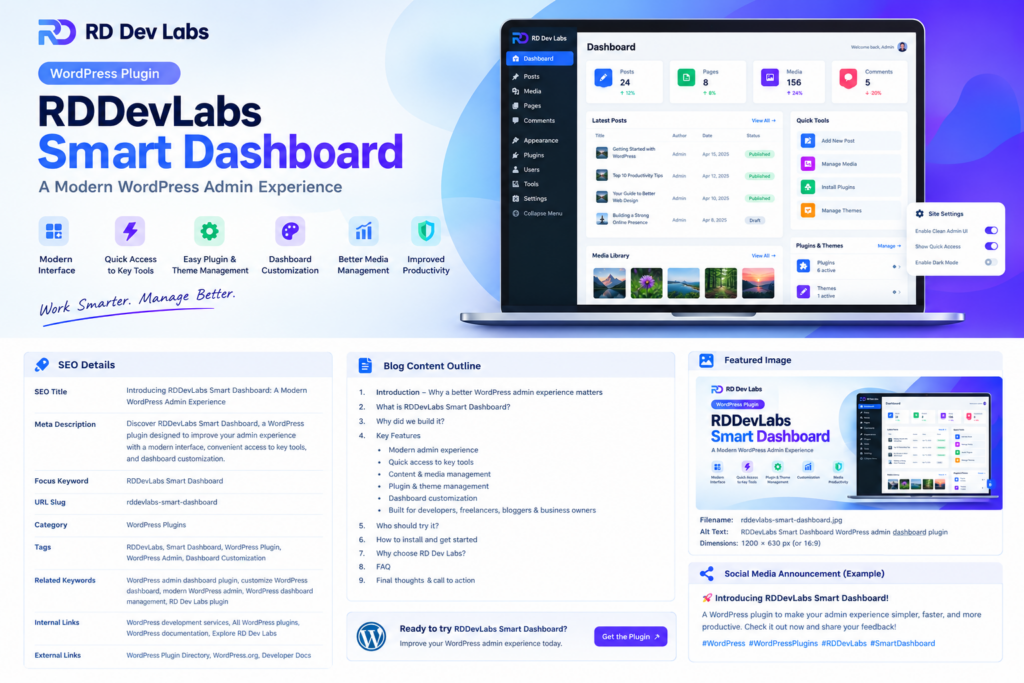
That’s why we’re excited to introduce RDDevLabs Smart Dashboard, our WordPress plugin designed to improve the WordPress administration experience.
Whether you’re a WordPress developer, freelancer, blogger or business owner, our goal is to help you enjoy a more convenient workflow while managing your website.
In this article, we’ll introduce RDDevLabs Smart Dashboard, explore its key features, explain who can benefit from it and show you how to get started.
What Is RDDevLabs Smart Dashboard?
RDDevLabs Smart Dashboard is a WordPress plugin developed by RD Dev Labs to provide a modern and customizable WordPress admin experience.
The plugin is designed to make website administration more convenient by bringing attention to useful management tools and providing options for a more personalized admin interface.
Rather than focusing only on the default dashboard, RDDevLabs Smart Dashboard aims to improve the way users interact with their WordPress administration area.
It is intended for people who spend time managing WordPress websites and want a more organized environment for their everyday work.
Why We Built RDDevLabs Smart Dashboard
WordPress offers powerful functionality, but website administrators often need to navigate multiple screens to complete everyday tasks.
Managing content, uploading media, working with plugins and themes, and adjusting settings can involve moving between different areas of the admin panel.
For developers and website managers, a more convenient interface can make routine work easier to organize.
With RDDevLabs Smart Dashboard, our aim is to improve the admin experience while respecting the functionality and flexibility that make WordPress valuable.
We want to build practical tools that help website owners work more comfortably and manage their websites with confidence.
Key Features of RDDevLabs Smart Dashboard
1. A Modern WordPress Admin Interface
Your admin dashboard is an important part of your website management workflow.
RDDevLabs Smart Dashboard is designed to offer a modern interface that helps make WordPress administration feel more organized.
A well-organized admin experience can help users navigate common tasks more comfortably and spend less time searching for the tools they need.
2. Convenient Access to Website Management
Running a WordPress website involves several administrative activities, from managing content to maintaining installed extensions.
RDDevLabs Smart Dashboard focuses on making common management workflows more convenient, helping users access relevant areas of their website administration.
3. Content and Media Workflows
Posts, pages and media are essential components of many WordPress websites.
Content creators and administrators need convenient ways to maintain their content and organize the images and files used across their websites.
RDDevLabs Smart Dashboard is designed with these everyday administration needs in mind.
4. Plugin and Theme Management
Plugins and themes allow WordPress users to extend functionality and customize the appearance of their websites.
Managing these components is an important part of maintaining a WordPress installation.
RDDevLabs Smart Dashboard aims to provide a convenient administration experience for supported plugin and theme management tasks.
5. Dashboard Customization
Every WordPress user has different preferences.
Some prefer a minimal interface, while others want more visual customization and convenient navigation.
RDDevLabs Smart Dashboard includes customization-oriented capabilities intended to help users adapt their admin environment to their preferences.
Explore the available settings in your installed version to see which appearance, branding and interface options are supported.
6. Built for WordPress Users
RDDevLabs Smart Dashboard is intended for a variety of WordPress users, including:
- Developers working on WordPress projects
- Freelancers managing client websites
- Bloggers publishing content regularly
- Small business owners maintaining their websites
- Administrators looking for a more personalized dashboard
The right fit depends on your workflow and the features available in your installed version.
Who Should Use RDDevLabs Smart Dashboard?
WordPress Developers
Developers who spend much of their working day inside WordPress may appreciate an admin environment designed around convenient navigation and management.
Freelancers and Agencies
Freelancers and agencies can evaluate the plugin on suitable client projects to see whether its features fit their administration workflow.
Bloggers and Content Creators
People who regularly publish articles, update pages and manage media may benefit from a more organized admin experience.
Small Business Owners
Business owners who manage their own WordPress websites can explore the available dashboard options to find a workflow that suits their needs.
How to Install RDDevLabs Smart Dashboard
If the plugin is available in the official WordPress Plugin Directory, follow these steps:
- Log in to your WordPress admin area.
- Navigate to Plugins → Add New Plugin.
- Search for RDDevLabs Smart Dashboard.
- Review the plugin listing and click Install Now.
- Click Activate.
- Open the plugin’s administration menu.
- Explore the available features and settings.
If you’re distributing the plugin as an installation ZIP, navigate to Plugins → Add New Plugin → Upload Plugin, upload the official package and activate it.
Before testing a new plugin on a production website, make a backup and consider using a staging environment.
Why Choose RD Dev Labs?
RD Dev Labs focuses on web development, WordPress solutions, eCommerce and useful tools for website owners.
Our goal is to create practical products that address real website management needs.
RDDevLabs Smart Dashboard represents another step in our journey to build useful WordPress tools and help website owners improve their everyday workflows.
We welcome feedback from WordPress users and developers. Your experience can help us understand which improvements would be most useful in future releases.
Frequently Asked Questions
What is RDDevLabs Smart Dashboard?
RDDevLabs Smart Dashboard is a WordPress plugin from RD Dev Labs designed to improve the WordPress administration experience.
Where can I download RDDevLabs Smart Dashboard?
Visit the official RD Dev Labs website or the plugin’s official WordPress Plugin Directory listing, if available. Use the verified plugin link provided on the official page.
Is RDDevLabs Smart Dashboard suitable for beginners?
The plugin is intended to make administration more convenient. Beginners should review its available settings and test unfamiliar functionality carefully.
Can I use the plugin on my business website?
You can evaluate it against your website’s requirements. Back up your site and test the plugin in a staging environment before deploying it on an important production website.
How can I get support?
Visit RD Dev Labs and use the support options available for RDDevLabs Smart Dashboard.
Get Started with RDDevLabs Smart Dashboard
We’re excited to introduce RDDevLabs Smart Dashboard and continue building practical tools for the WordPress community.
If you regularly manage a WordPress website, explore the plugin and see whether its features can make your admin workflow more convenient.
Ready to try it?
Visit RD Dev Labs for more WordPress tutorials, web development insights, plugin announcements and website management tips.
RD Dev Labs — Building Websites That Grow Businesses.